
Aadhaar-based electronic signatures represent one of India’s most significant digital infrastructure achievements. By leveraging the Aadhaar identity platform for authentication, the eSign framework enables any individual with an Aadhaar number and a linked mobile phone to affix a legally binding signature to an electronic document, without physical presence, hardware tokens, or paper. The implications for contract execution, including rental agreements, are substantial.
This guide examines the complete eSign ecosystem: the technical architecture, the multi-layered legal framework that underpins its validity, the distinction between eSign and other forms of electronic and digital signatures, the specific application to rental agreements, and the practical considerations that both signers and relying parties should understand.
The Technical Architecture of Aadhaar eSign
Understanding how eSign works technically is essential to appreciating why it is legally robust. The process involves multiple independent systems and entities, each playing a specific role in ensuring authenticity, integrity, and non-repudiation.
The Participants
Signer: The individual who wishes to sign the document. The only prerequisites are a valid Aadhaar number and an active mobile number linked to Aadhaar. The signer does not need any hardware token, software installation, or prior registration, Aadhaar itself serves as the identity foundation.
Application Service Provider (ASP): The platform or application through which the document is presented for signing. This could be a rental agreement platform, a banking application, a government portal, or any software system that integrates with the eSign API. The ASP is responsible for presenting the document to the signer, collecting the Aadhaar number, and forwarding the signing request to the ESP. The ASP does not handle the cryptographic signing itself.
Electronic Signature Provider (ESP): The licensed intermediary that processes the signing request. Only two entities are authorized as ESPs: NSDL e-Governance Infrastructure Limited and C-DAC (Centre for Development of Advanced Computing). The ESP receives the signing request from the ASP, coordinates with UIDAI for authentication, requests a digital certificate from a Certifying Authority, and performs the cryptographic signing of the document hash.
UIDAI (Unique Identification Authority of India): Provides the authentication layer. When the signer enters their Aadhaar number and the OTP sent to their Aadhaar-linked mobile, UIDAI verifies the identity. UIDAI does not participate in the document signing itself, it only confirms that the person requesting the signature is who they claim to be.
Certifying Authority (CA): A licensed entity under Section 24 of the IT Act that issues the digital certificate used for signing. NSDL e-Governance and C-DAC both hold CA licenses, so they can issue certificates directly. The certificate issued during an eSign transaction is a short-lived certificate, valid for only approximately 30 minutes, specifically generated for that single signing event.
The Step-by-Step Process
 What happens in the roughly one minute it takes to eSign.
Step 1, Document Presentation: The ASP presents the document (typically a PDF) to the signer through its application interface. The signer reviews the document and initiates the signing process.
Step 2, Aadhaar Number Input: The signer provides their Aadhaar number. The ASP forwards this to the ESP along with the document hash (a cryptographic digest of the document content).
Step 3, OTP Generation and Delivery: The ESP sends an authentication request to UIDAI. UIDAI generates a one-time password (OTP) and sends it via SMS to the mobile number registered with the signer’s Aadhaar. This OTP is valid for a limited period (typically 10 minutes).
Step 4, OTP Verification: The signer enters the OTP in the ASP’s interface. The ASP forwards the OTP to the ESP, which relays it to UIDAI for verification. UIDAI confirms whether the OTP is correct and valid.
Step 5, Certificate Generation: Upon successful authentication, the ESP requests a short-lived digital certificate from the Certifying Authority. This certificate contains the signer’s identity information (derived from the Aadhaar authentication response) and a public-private key pair generated specifically for this signing event.
Step 6, Document Signing: The ESP signs the document hash using the private key associated with the newly generated certificate. The signing operation creates a cryptographic binding between the document content and the signer’s identity.
Step 7, Completion and Embedding: The signed document is returned to the ASP with the digital certificate and signature embedded. The signed PDF contains the digital signature, the certificate chain (tracing back to the licensed CA), a timestamp, and an audit trail of the authentication event.
Security Features
Short-Lived Certificates: The digital certificate generated during eSign is valid for approximately 30 minutes. This is a deliberate security design, since the certificate exists only for the duration of the signing session, it cannot be misused later. Unlike traditional digital signature certificates (DSCs) that are valid for 2 years and stored on hardware tokens, eSign certificates are ephemeral.
Aadhaar Authentication: The identity verification is anchored to Aadhaar, which is itself backed by biometric data (fingerprints and iris scans). While the eSign process uses OTP-based authentication (not biometric), the underlying identity was established through biometric enrollment. This provides a strong identity assurance level.
Document Hash Signing: The eSign process signs the document hash, not the document content itself. This means any modification to the document after signing invalidates the signature, the hash of the modified document will not match the signed hash, and PDF readers will flag the signature as invalid.
Audit Trail: Every eSign transaction generates a detailed audit trail: the timestamp of the signing request, the authentication event, the certificate issuance, and the signing completion. This audit trail is evidence of the signing event and supports non-repudiation.
The Legal Framework
The legal validity of Aadhaar eSign rests on a well-established chain of legislation, rules, and administrative authorizations. Understanding this chain is important because legal challenges to e-signed documents typically target one link in this chain.
Information Technology Act, 2000
The IT Act is the foundational legislation governing electronic records and electronic signatures in India.
Section 2(ta), Definition of Electronic Signature: Inserted by the IT (Amendment) Act, 2008, this section defines “electronic signature” to mean authentication of any electronic record by a subscriber by means of the electronic technique specified in the Second Schedule and includes digital signature. This is the broadest category, encompassing multiple approved techniques.
Section 3, Authentication of Electronic Records (Digital Signature): The original provision of the IT Act dealing with digital signatures based on asymmetric cryptography (Public Key Infrastructure or PKI). This applies to traditional digital signature certificates (DSCs) issued on hardware tokens.
Section 3A, Electronic Signature: Introduced by the IT (Amendment) Act, 2008, this is the provision that enables Aadhaar eSign. It provides that any electronic signature or electronic authentication technique that is considered reliable and is specified in the Second Schedule shall be a valid electronic signature. The Aadhaar eSign technique has been notified by the Central Government in the Second Schedule, thereby satisfying this requirement.
The significance of Section 3A is that it expanded the legal framework beyond traditional PKI-based digital signatures to include newer, more accessible authentication techniques like Aadhaar eSign. This was a deliberate policy decision to enable wider adoption of legally valid electronic signing without requiring hardware tokens.
Section 4, Legal Recognition of Electronic Records: This section provides that information shall not be denied legal effect, validity, or enforceability solely on the ground that it is in electronic form. This is the general provision that prevents discrimination against electronic documents.
Section 5, Legal Recognition of Electronic Signatures: This is the functional equivalence provision. It states that where any law requires that a document be attested, signed, or bears the signature of any person, that requirement is deemed satisfied if the document bears an electronic signature. This provision equates electronic signatures with physical (wet ink) signatures for all legal purposes, subject to the exclusions in Section 1(4).
Section 1(4), Exclusions: The IT Act does not apply to certain categories of documents. The following cannot be executed using electronic signatures: negotiable instruments (cheques, promissory notes, bills of exchange) other than under a banker’s use; powers of attorney as defined in the Powers of Attorney Act, 1882; trust deeds as defined in the Indian Trusts Act, 1882; wills and testamentary dispositions under the Indian Succession Act, 1925; and contracts for sale or conveyance of immovable property or any interest in such property (though this last category has been interpreted narrowly, rental agreements, being licenses or leases rather than conveyances, are generally considered outside this exclusion).
Section 17, Appointment of Controller of Certifying Authorities: Establishes the CCA as the apex regulatory body for digital and electronic signatures. The CCA licenses Certifying Authorities, approves electronic signature techniques, and authorizes ESPs.
Section 24, Licence to Issue Electronic Signature Certificates: Requires Certifying Authorities to hold a license from the CCA to issue digital or electronic signature certificates.
Section 85B, Presumptions as to Electronic Signatures: This section creates a legal presumption that when an electronic signature is affixed to an electronic record, the court shall presume that the electronic record was authenticated by the subscriber. This shifts the burden of proof, the person challenging the signature must prove it is invalid, rather than the person relying on it proving it is valid.
e-Authentication Guidelines, 2019
Issued by the Controller of Certifying Authorities on May 3, 2019, these guidelines provide the operational regulatory framework for Aadhaar eSign services. The guidelines are legally binding on all participants in the eSign ecosystem.
Key Provisions:
The guidelines define the roles and responsibilities of Application Service Providers (ASPs) and Electronic Signature Providers (ESPs). ASPs must enter into agreements with ESPs and comply with technical integration requirements. ESPs must maintain secure infrastructure, implement proper audit logging, and comply with privacy requirements.
The guidelines mandate specific security requirements: encrypted communication between ASP and ESP, secure storage of audit logs, compliance with UIDAI’s authentication API specifications, and adherence to certificate issuance standards.
The guidelines establish privacy protections: the ASP must obtain the signer’s consent before initiating eSign, the ASP must not store the signer’s Aadhaar number after the transaction is complete, and the ESP must not retain any biometric or personal data beyond what is necessary for the signing transaction.
Controller of Certifying Authorities (CCA)
The CCA, established under Section 17 of the IT Act, is the regulatory authority that oversees the entire digital and electronic signature ecosystem. Its functions relevant to eSign include licensing Certifying Authorities (currently NSDL e-Governance and C-DAC, among others), authorizing Electronic Signature Providers, approving electronic signature techniques for notification in the Second Schedule, conducting audits of CAs and ESPs, and maintaining the Root Certifying Authority of India (RCAI), which is the trust anchor for all Indian digital certificates.
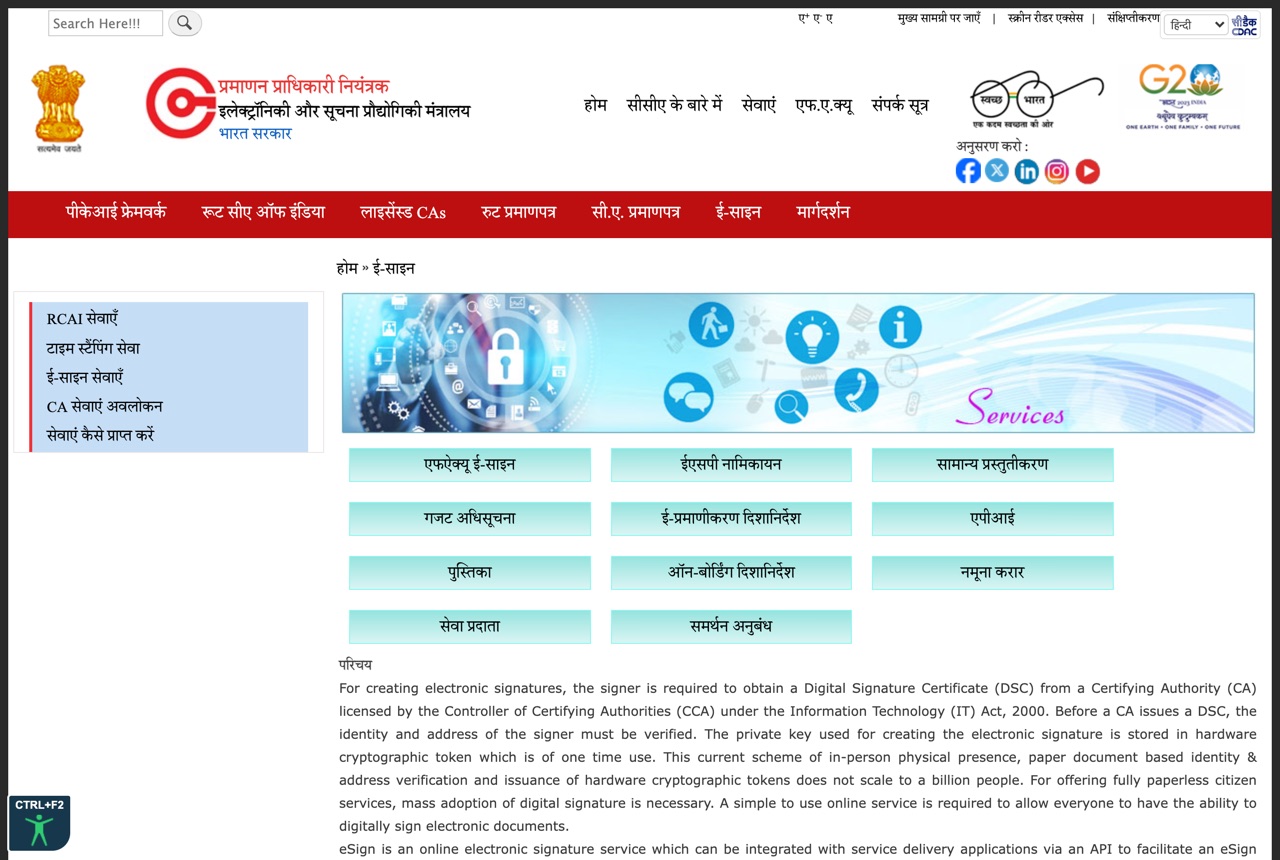 The Controller of Certifying Authorities (CCA) eSign page (cca.gov.in), the official regulator for electronic signatures under the IT Act, 2000. Source: CCA, Ministry of Electronics and Information Technology.
The CCA’s authorization of an ESP is a formal administrative act that confers legal authority on the ESP to provide eSign services. An entity providing eSign services without CCA authorization would be operating outside the legal framework, and signatures generated through such an entity may not qualify as valid electronic signatures under the IT Act.
Authorized Electronic Signature Providers
As of mid-2025, only two entities are authorized by the CCA as Electronic Signature Providers.
NSDL e-Governance Infrastructure Limited: NSDL e-Governance (now known as Protean eGov Technologies Limited, though the eSign authorization may still reference the NSDL e-Governance name) is one of the largest digital infrastructure entities in India. It operates PAN card issuance, tax information network services, and various e-governance platforms. It holds a CA license from the CCA and is authorized as an ESP. NSDL e-Governance’s eSign API is widely integrated by application service providers across banking, insurance, rental platforms, and government portals.
C-DAC (Centre for Development of Advanced Computing): C-DAC is an autonomous scientific society under the Ministry of Electronics and Information Technology. It operates research and development in advanced computing and also functions as a CA and ESP. C-DAC’s eSign services are used primarily by government applications and platforms.
Why Only Two Providers Matter: The restriction to two authorized ESPs is a deliberate regulatory choice that ensures quality control, security oversight, and accountability. Any application that claims to offer Aadhaar eSign must route the signing request through one of these two ESPs. If a platform uses any other entity for the signing process, the resulting signature may not meet the legal requirements for a valid electronic signature under Section 3A.
Verification by Users: When using an eSign service, users can verify the ESP being used by checking the digital certificate embedded in the signed PDF. The certificate’s issuer field should trace back to NSDL e-Governance or C-DAC. Adobe Acrobat Reader and other PDF viewers display this certificate chain when you click on the signature.
E-Sign vs. Digital Signature vs. Other Electronic Marks
The terminology around electronic signing is frequently confused, leading to incorrect assumptions about legal validity. The distinctions are legally significant.
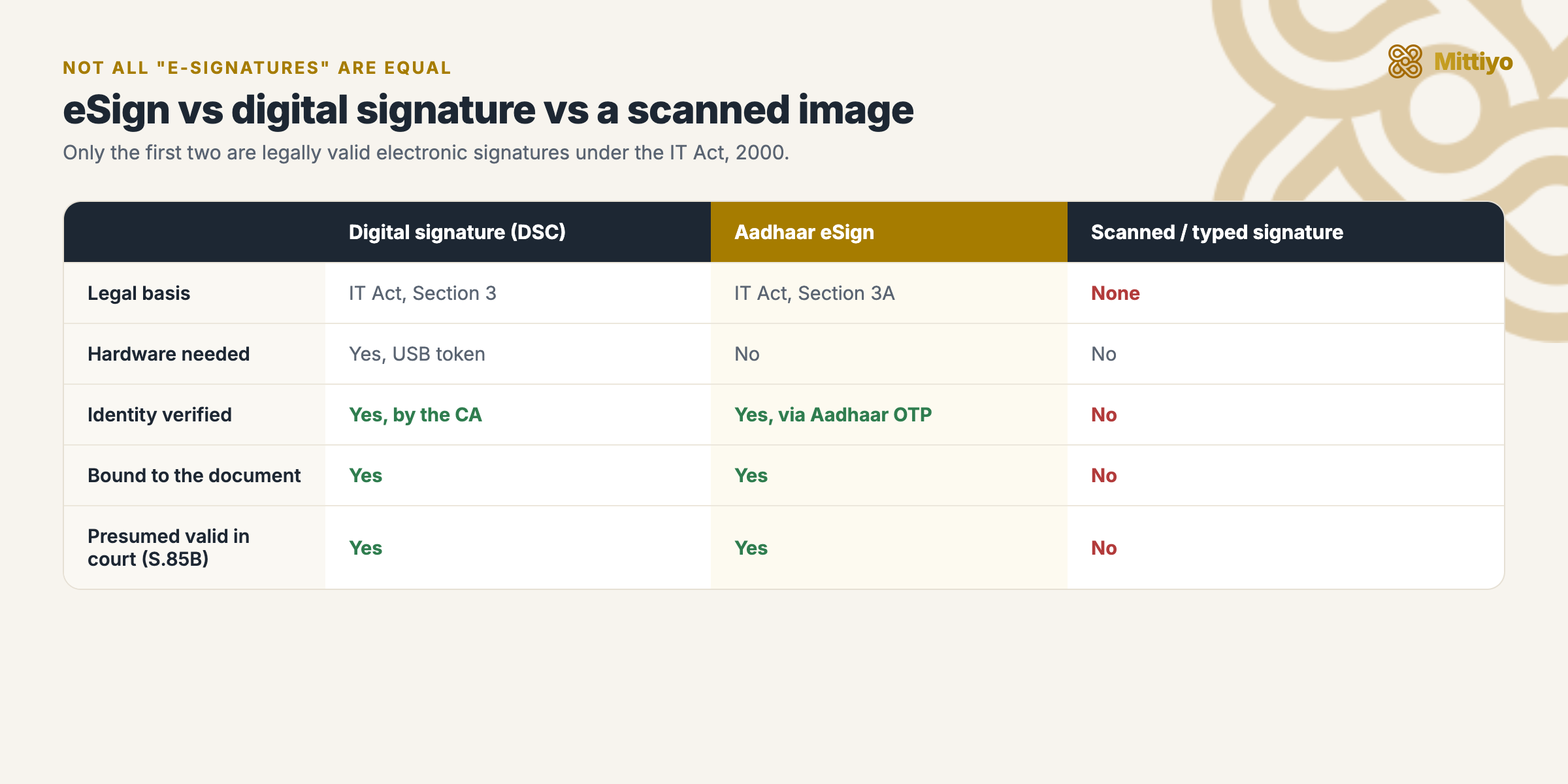 Only the first two are valid electronic signatures under the IT Act.
Digital Signature Certificate (DSC), Section 3
A DSC is the original form of legally valid electronic authentication under the IT Act. It uses Public Key Infrastructure (PKI) technology: the signer holds a hardware USB token containing a private key, and a corresponding public key is embedded in a certificate issued by a licensed Certifying Authority. The DSC is valid for 2 years and must be renewed.
DSCs are primarily used for filing income tax returns, company filings with the Ministry of Corporate Affairs (MCA21), GST returns, e-tendering, and other regulatory filings. The key characteristic is that the signer must possess and use the physical hardware token at the time of signing.
Aadhaar eSign, Section 3A
As detailed above, Aadhaar eSign eliminates the need for hardware tokens by using Aadhaar OTP authentication and short-lived certificates. The legal basis is Section 3A (not Section 3), and the enabling mechanism is the notification of the eSign technique in the Second Schedule. The key advantage is accessibility: any Aadhaar holder with a linked mobile number can sign, without prior registration, hardware purchase, or physical presence.
Simple Electronic Marks
This category includes typed names in email signatures, scanned images of handwritten signatures pasted into documents, “click-to-accept” buttons on websites, and hand-drawn signatures on tablet screens. These marks are NOT electronic signatures under the IT Act. They have no cryptographic binding to the document, no identity verification mechanism, no audit trail, and no legal presumption of validity under Section 85B.
A scanned image of a handwritten signature pasted into a PDF is particularly misleading, it looks like a signature but has no technical or legal connection to the document’s integrity. Anyone can copy and paste such an image. Courts have consistently distinguished between these informal marks and legally valid electronic or digital signatures.
| Feature | Digital Signature (DSC) | Aadhaar eSign | Simple Electronic Mark |
|---|---|---|---|
| Legal Basis | IT Act Section 3 | IT Act Section 3A | None specific |
| Technology | PKI, hardware USB token | Aadhaar OTP + ephemeral certificate | None (image, text, click) |
| Hardware Required | Yes (USB token) | No | No |
| Identity Verification | CA verifies identity during DSC issuance | UIDAI verifies via Aadhaar OTP | None |
| Certificate Validity | 2 years | Approximately 30 minutes | N/A |
| Cryptographic Binding | Yes (hash signed with private key) | Yes (hash signed with private key) | No |
| Non-Repudiation | Strong (signer possessed the token) | Strong (signer authenticated via Aadhaar OTP) | Weak (no verification) |
| Legal Presumption (S.85B) | Yes | Yes | No |
| Court Admissibility | Admissible as electronic record | Admissible as electronic record | May be challenged |
Can You E-Sign a Rental Agreement?
Why Rental Agreements Can Be E-Signed
Rental agreements (whether structured as leave and license agreements or lease deeds) are not in the exclusion list under Section 1(4) of the IT Act. The exclusion for “contracts for sale or conveyance of immovable property” has been interpreted to apply to permanent transfers of ownership (sale deeds, gift deeds), not to temporary possession arrangements like leases and licenses. This interpretation is consistent with the distinction in property law between a conveyance (which transfers title) and a lease or license (which transfers only possession for a defined period).
Therefore, rental agreements can be validly executed using Aadhaar eSign, and such agreements have the same legal standing as physically signed agreements.
What Is Actually Signed
When a rental agreement is e-signed, the entire document (as a PDF) is the subject of the signature. Each signatory, landlord and tenant, e-signs the document separately, and each e-sign creates a separate digital certificate embedded in the PDF. The signed PDF therefore contains multiple digital signatures, one for each signatory, each with its own certificate, timestamp, and authentication record.
If the agreement has witnesses (which is recommended though not legally required for most rental agreements), the witnesses can also e-sign the document. Each witness’s eSign creates an additional certificate layer.
E-Stamp and E-Sign: Two Different Things
A common source of confusion is between e-stamping and e-signing. These are completely different processes that serve different legal purposes.
E-Stamping is the electronic method of paying stamp duty. Instead of purchasing physical stamp paper, the stamp duty is paid through the Stock Holding Corporation of India Limited (SHCIL) e-stamping system, and an e-stamp certificate with a unique identification number is generated. This certificate is affixed to or accompanies the agreement as proof that stamp duty has been paid.
E-Signing is the method of affixing signatures to the agreement. An agreement can be e-stamped but physically signed, or e-signed but stamped on physical stamp paper, or both e-stamped and e-signed.
For a fully digital rental agreement, both e-stamping (for stamp duty compliance) and e-signing (for signature validity) should be used.
Evidentiary Admissibility
An e-signed rental agreement is an “electronic record” under the IT Act and the Bharatiya Sakshya Adhiniyam, 2023 (BSA), which replaced the Indian Evidence Act for proceedings from July 1, 2024 onward.
Section 63 of the BSA (formerly Section 65B of the Indian Evidence Act): This section governs the admissibility of electronic records as evidence. An electronic record is admissible if it is accompanied by a certificate under Section 63(4) of the BSA, which certifies the electronic record’s authenticity, the manner of its production, and the identity of the device or system that produced it.
The Supreme Court in Arjun Panditrao Khotkar v. Kailash Kushanrao Gorantyal (2020) 7 SCC 1 held that the Section 65B(4) certificate (now Section 63(4) of BSA) is a mandatory requirement for the admissibility of electronic evidence. This applies to e-signed documents as well. The practical implication is that when presenting an e-signed agreement in court, you must also produce a certificate under Section 63(4) authenticating the electronic record.
Section 85B of the IT Act, Presumption as to Electronic Signatures: As noted earlier, this section creates a presumption in favor of the validity of the electronic signature. The person challenging the e-signed document bears the burden of proving that the signature is invalid.
Registration Requirements
Under the Registration Act, 1908, lease deeds for a period exceeding 12 months must be registered with the sub-registrar. As of mid-2025, the registration process at most sub-registrar offices in Karnataka requires physical presence of the parties. This means that even if an agreement is e-signed, if it is for a period exceeding 12 months, the parties must physically appear before the sub-registrar for registration.
For the standard 11-month leave and license agreement (which does not require compulsory registration), e-signing is a fully digital process with no physical presence requirement.
Police Verification
Karnataka Police (KSP) requires tenant verification for all rental properties. The question frequently arises whether e-signed rental agreements are accepted for police verification purposes. In practice, KSP accepts e-signed agreements. The tenant verification process requires submission of the rental agreement (physical or digital), tenant and landlord ID proof, and passport-size photographs. A printout of the e-signed PDF with visible digital signatures is generally accepted. Online tenant verification through the Bataonline portal may allow direct upload of the e-signed PDF.
Verifying an E-Signed Document
When you receive an e-signed document, verification ensures the signatures are authentic and the document has not been tampered with.
Using Adobe Acrobat Reader
- Open the signed PDF in Adobe Acrobat Reader (DC or newer).
- Acrobat will display a notification bar at the top indicating the signature status.
- Click on the signature panel to view each signature.
- For each signature, verify: the signer’s name, the timestamp, the certificate issuer (should trace back to NSDL e-Governance or C-DAC), and the document integrity status (“Document has not been modified since this signature was applied”).
- If the certificate chain is valid and the document integrity check passes, the signature is authentic.
Certificate Chain Verification
The certificate chain for a valid Aadhaar eSign signature typically follows this hierarchy:
- Root Certificate: Root Certifying Authority of India (RCAI), maintained by CCA
- Intermediate Certificate: The licensed CA (NSDL e-Governance or C-DAC)
- End-Entity Certificate: The signer’s short-lived certificate issued during the eSign event
If any link in this chain is missing, expired, or untrusted, the signature verification will fail. Adobe Acrobat Reader maintains a list of trusted root certificates, the RCAI root should be in this list. If it is not, you may need to manually add it from the CCA’s website (cca.gov.in).
What a Failed Verification Means
If the verification shows “Document has been modified since signing,” it means the document content was altered after the signature was applied. This is a critical red flag, the document is not the same as what was signed.
If the verification shows an untrusted certificate, it may mean the signing was not done through an authorized ESP, or the root certificate is not in your PDF reader’s trust store. Investigate further before relying on the document.
Limitations and Exceptions
Documents That Cannot Be E-Signed
As specified in Section 1(4) of the IT Act, the following categories of documents cannot be executed using electronic signatures (including Aadhaar eSign):
Negotiable Instruments: Cheques, promissory notes, and bills of exchange (except for banking purposes). The negotiability of these instruments depends on physical possession and endorsement, which is incompatible with electronic execution.
Powers of Attorney: A power of attorney under the Powers of Attorney Act, 1882 must be executed on physical stamp paper and registered (if it involves immovable property transactions). E-signing is not valid.
Trust Deeds: Trust deeds under the Indian Trusts Act, 1882 require physical execution.
Wills and Testamentary Dispositions: Wills under the Indian Succession Act, 1925 must be physically signed and attested by witnesses. The solemnity requirements of a will, including the testator’s signature in the presence of witnesses, are incompatible with remote e-signing.
Important clarification for rental agreements: Rental agreements, whether structured as leave and license agreements or lease deeds for a term of years, are NOT in this exclusion list. They can be validly e-signed.
Practical Limitations
Aadhaar-Mobile Linkage: The signer’s Aadhaar must have an active linked mobile number. If the mobile number linked to Aadhaar has changed or is inactive, the OTP cannot be delivered, and eSign cannot proceed. The signer must first update their Aadhaar mobile linkage through UIDAI.
Internet Connectivity: The eSign process requires real-time communication between the ASP, ESP, and UIDAI systems. Both the signer and the ASP platform require active internet connectivity during the signing process.
OTP Delivery Delays: In rare cases, OTP delivery via SMS may be delayed due to telecom network issues. Most eSign implementations provide a “Resend OTP” option, and the OTP typically remains valid for 10 minutes.
Non-Resident Indians (NRIs): NRIs with Aadhaar can use eSign, but the OTP is sent to the Indian mobile number linked to their Aadhaar. If the NRI does not have an active Indian mobile number, eSign is not available. Some NRIs maintain an Indian number specifically for Aadhaar-linked services.
Common Concerns and Misconceptions
| Concern | Factual Position |
|---|---|
| “E-signed agreements will not hold up in court” | Legally equivalent to physical signatures under Section 5 of the IT Act. Section 85B creates a presumption of validity. |
| “The landlord or tenant can deny signing” | Aadhaar OTP authentication provides strong non-repudiation. The signer would need to prove that their Aadhaar was compromised, which is an extremely high evidentiary bar. |
| “Police will not accept e-signed agreements” | Karnataka Police accepts e-signed agreements for tenant verification. A printout with visible digital signatures is sufficient. |
| “Sub-registrar will not register it” | For agreements requiring registration (exceeding 12 months), physical presence is currently required at the sub-registrar office in Karnataka. The e-signed document itself is valid, but the registration process has its own attendance requirements. |
| “E-signed documents can be forged” | Forging an Aadhaar eSign requires compromising the signer’s Aadhaar, the UIDAI authentication system, the ESP’s signing infrastructure, and the CA’s certificate issuance process, simultaneously. This is orders of magnitude more difficult than forging a physical signature. |
| “My scanned signature in a PDF is the same thing” | A scanned signature image has no cryptographic binding, no identity verification, and no legal presumption of validity. It is not an electronic signature under the IT Act. |
Practical Recommendations
For Tenants:
Verify that the platform you are using routes eSign through NSDL e-Governance or C-DAC. Before signing, ensure your Aadhaar-linked mobile number is active and can receive SMS. After signing, download and save the signed PDF to your own device, do not rely solely on the platform to store it. The signed PDF contains the embedded digital certificates, which are the proof of the signature. Keep a copy of the e-stamp certificate (if used for stamp duty) alongside the signed agreement.
For Landlords:
An e-signed agreement has the same legal standing as a physically signed one. The eSign audit trail (timestamp, Aadhaar authentication log) actually provides stronger evidentiary support than a physical signature, which can be denied more easily. For police verification, provide the tenant with a signed PDF copy that they can present or print.
For Both Parties:
Retain the signed PDF indefinitely. Digital storage is inexpensive, and the document may be needed years later for disputes, tax documentation, or address proof. Verify the signatures in the PDF using Adobe Acrobat Reader or a similar tool after signing. Ensure the stamp duty has been paid appropriately, an e-signed agreement without proper stamping is still inadmissible under the Karnataka Stamp Act, regardless of the signature’s validity.
Key Takeaways
- Aadhaar eSign is legally valid under Section 3A and Section 5 of the Information Technology Act, 2000. The technique is notified in the Second Schedule by the Central Government.
- Only NSDL e-Governance and C-DAC are authorized Electronic Signature Providers. Verify that any eSign service routes through one of these two ESPs.
- An e-signed document has the same legal standing as a physically signed document. Section 85B of the IT Act creates a presumption of validity, shifting the burden of proof to the challenger.
- The eSign process uses short-lived (approximately 30-minute) digital certificates and Aadhaar OTP authentication, providing strong non-repudiation.
- Rental agreements can be e-signed. They are not in the exclusion list under Section 1(4) of the IT Act.
- For court admissibility, maintain a Section 63 certificate under the Bharatiya Sakshya Adhiniyam, 2023 (or Section 65B under the Indian Evidence Act for pre-July 2024 proceedings) along with the e-signed document.
- Scanned signatures, typed names, and click-to-accept buttons are not electronic signatures under the IT Act and do not have the same legal standing.
- E-stamping and e-signing are different processes. A properly executed digital rental agreement requires both: e-stamping for stamp duty compliance and e-signing for signature validity.
- Always download and retain the signed PDF with its embedded digital certificates. This document is your proof of the agreement’s execution.
Signing a rental agreement soon?
An e-signed agreement is only as good as the home behind it. Before you commit, see what residents say a building actually rents for, the deposit, the society, the water and power reality, on know.place, a map of honest, building-level rental experiences across India.
Explore know.placeReferences
- Information Technology Act, 2000, Sections 2(ta), 3, 3A, 4, 5, 17, 24, 85B, Electronic signature definitions, authentication, legal recognition, CCA establishment, CA licensing, and presumptions. Available at: indiacode.nic.in
- Information Technology (Amendment) Act, 2008, Introduction of Section 3A and the electronic signature framework
- Second Schedule to the Information Technology Act, 2000, Notification of approved electronic signature techniques including Aadhaar eSign
- e-Authentication Guidelines issued by the Controller of Certifying Authorities, May 3, 2019, Regulatory framework for Aadhaar eSign, ASP and ESP roles, security requirements
- IT Act, Section 1(4), Documents excluded from electronic execution (negotiable instruments, powers of attorney, trusts, wills)
- Bharatiya Sakshya Adhiniyam, 2023, Section 63, Admissibility of electronic records and certification requirements
- Arjun Panditrao Khotkar v. Kailash Kushanrao Gorantyal, (2020) 7 SCC 1, Supreme Court on mandatory Section 65B(4) certificate for electronic evidence admissibility
- Registration Act, 1908, Section 17, Compulsory registration of leases exceeding 12 months
- Karnataka Stamp Act, 1957, Stamp duty requirements for rental agreements
- Powers of Attorney Act, 1882, Requirements for valid powers of attorney (excluded from electronic execution)
- Indian Trusts Act, 1882, Requirements for trust deeds (excluded from electronic execution)
- Indian Succession Act, 1925, Requirements for wills and testamentary dispositions (excluded from electronic execution)
- CCA Website (cca.gov.in), Root Certifying Authority of India certificate and CA directory